Illustration and Visual Narrative - Project 1

14/04/2020 - 11/05/2020 (Week1 - Week5)
Hong Ze Yee / 0335678
Project 1 - Character Design
INSTRUCTION
PROJECT 1 - Character Design
Developing character by using shapes
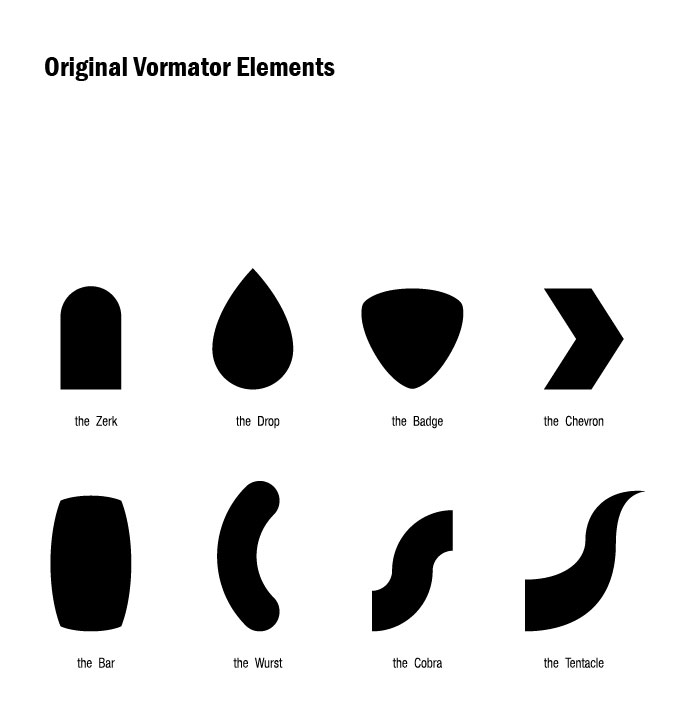
figure 1
We can only use these 8 shapes


figure 2
references

figure 3
after all, I choose both of these words as keyword when creating vormator
Developing the design of character :

figure 3
Small and cute. the mian thing that make the character cute is big eyes, big head and chubbiness. the cuteness of this character is based on the proportion of the body plus the expression of shyness.

figure 4
This character is inspired by a wooden kegs and I think it can have the green fire on the head woth a brown colour body which represents the colour of nature. This cahracter looks more nature and peaceful.
figure 5
This is the first vormator that I've created. At first, I started out by using illustrator to create character by using the 8 shapes and see which can combine it together. As the result, I came out with this vormator which looks cute and friendly.
figure 6
This vormator is more on mysterious and squishy with six eyes, six legs and six teeth.
figure 1
I have chosen this vormator because he is cute and friendly with a little bit of shyness. The thing that make this character looks cute is big head, chubbiness and the proportions of the body plus expressions of shyness.

figure 1
playing around with colours. I used it to match various colours and see which one will be more outstanding.


figure 2
The cards

figure 3
created four different background to see which one is better for it

figure 1
After consultation, Miss Yvonne suggest me to choose either green colour or blue colour vormator as my final vormator then I can move on to the card composition. At the end, I've chosen this one as my final vormator.
figure 2
four different colour of cards that I have chosen to match with my background
figure 3
Finalized
FEEDBACK
Week 1 :
No feedback is given.
Week 2 :
Since I have problem signing in to Teams by using Taylor's email so i have to catch up with everything and try to design my character and do the pear exercise.
Week 3 :
I have to redo the other two out of the four vormators because we supposed to be only using the 8 shapes that given by lecturer but I have created some shapes randomly.
Week 4 :
I have come out with a concept of my character which is cute and friendly. After the feedback of my vormator, I started to do variations of colour on my vormator and then let teacher consult it before I continue. At the end, I choose the blue one as my final design and start to design my background and card.
REFLECTION
At the very beginning, I think this project is very hard and I was a little bit confuse about the instruction because I am not able to join the class due to some technical difficulties. After consulted with lecture personally, I understood the concept and started to think about the characteristic of my character design. I thought it was hard but in the progress, I was having fun with it especially when playing around of colours. Overall, I learn about some skills in Adobe Illustrator and access some tools. The first thing that should have before designing the character is the concept and the keyword. Then we can only develop the design outlook of our character from the characteristic.


Comments
Post a Comment